HAVEN Product Overview
Understand how a stay connects to guest balances, service work, accounting, owner statements, and reports, then recognize which records and outcomes still need attention.
For Reservation staff and bookkeepers.
- No prior HAVEN knowledge is assumed. The examples are fictional records in the local development preview.
- Read this overview to understand relationships; use the Navigation Guide to practice finding and interpreting existing records.
Understand the work HAVEN connects
Use the stay as a starting point for understanding the guest, the work, and the money.
One stay creates several kinds of work
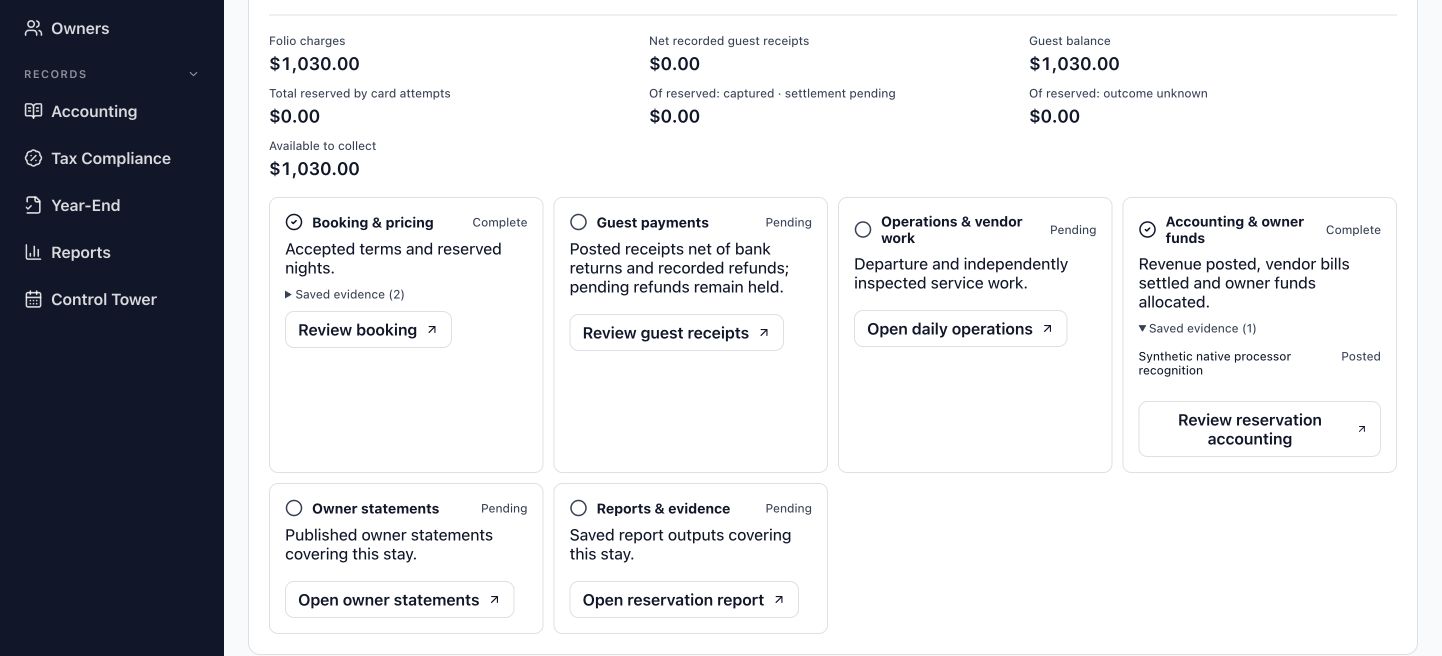
A reservation establishes dates and agreed charges. The guest may then owe money, a cleaner may need an assignment, and an owner may eventually receive income and a statement. Each event answers a different question. HAVEN connects these records so you can follow their relationship without treating a booking, a payment, and an accounting result as the same thing. The six connected stages are booking and pricing, guest payments, operations and vendor work, accounting and owner funds, owner statements, and reports.
Start with the question you need to answer
Reservation staff need to establish what the guest agreed to and what remains due. Bookkeepers need to understand which amounts have been posted, which bank evidence supports them, and how they affect owners and reports. Operations staff contribute departure, service, and inspection records. Reviewers assess decisions that require approval. These responsibilities can overlap, while the available actions depend on each person's permissions.
Understand the current scope
HAVEN is being developed as a standalone replacement for Escapia. Reservations created within HAVEN use its own records and require no Escapia connection. The local preview demonstrates a supported connected lifecycle; it does not yet provide every production workflow or complete Escapia feature coverage. This overview explains how to read that lifecycle before you begin performing transactions.
The stages connect related work. They do not require every task to happen in a single uninterrupted sequence.
Read a reservation and its folio
Use one fictional stay to separate the booking agreement from the guest's financial position.
Begin with the stay identity
The existing fictional Hale Mālie reservation runs from 23 to 27 October 2026. Its reservation record identifies the property, stay dates, and accepted terms. Confirming that identity matters when several records concern the same property. A property name alone does not identify one guest's stay, and a related owner or payment record answers a different question.
Use the folio to understand the balance
A folio is the guest's financial record for the stay. It brings together charges and the financial activity applied to them. Hale Mālie's current charges total $1,030: $1,000 rent and a $30 disclosed processing fee. Recorded guest receipts are $0, leaving a guest balance of $1,030. The charge establishes an amount owed; it does not establish that the guest has paid.
Read amounts in their context
The $30 fee belongs to this synthetic example. It is not a production fee rate, a suggested surcharge, or proof of an actual processing cost. A current charge total also differs from the original accepted quote when a reviewed change has been applied. Read the current terms, the financial record, and the change history together to understand the amount now due.
| Hale Mālie example | Current amount |
|---|---|
| Rent | $1,000 |
| Disclosed synthetic processing fee | $30 |
| Current charges | $1,030 |
| Recorded guest receipts | $0 |
| Guest balance | $1,030 |
This is an existing local demonstration record. Reading it creates no new booking, payment, or customer communication.
Distinguish a charge from collected cash
A request, a processor confirmation, and a bank receipt describe different points in a payment's progress.
An amount due is the starting point
Hale Mālie still has $1,030 due and no recorded guest receipt. Preparing a payment request would not reduce that balance or establish bank cash. An active or uncertain request can reserve collection capacity so the same amount is not collected again. A failed attempt needs its saved outcome reviewed before another attempt is created; an unknown result is not permission to retry.
Processor confirmation comes before bank evidence
If a processor later confirms a card collection, that confirmation concerns the card transaction. It is not yet a bank-posted receipt. A payout can combine collections and deduct actual processing costs. HAVEN's supported settlement review connects the gross guest amounts, actual fees, payout, and matched bank evidence before accounting posting. A payout draft or approval alone does not establish received cash. These are possible later events, not events completed for Hale Mālie.
Owner income is separate from distributable money
Income describes the amount earned under the applicable accounting and owner terms. Available owner funds describe money that can support a distribution after the relevant obligations and holds. A returned guest payment can reopen the guest's balance while earned owner income remains recorded. The uncollected amount is still unavailable for distribution. A guest processing fee also cannot automatically become extra owner income or an assumed deduction from the owner.
Stripe test checkout and payment-confirmation validation still await protected credentials. Live card payments and bank execution are not ready.
Follow service work into financial records
Use related evidence to understand what a completed stage establishes and what it leaves outstanding.
Service completion and payment are separate outcomes
Hale Mālie's stay dates alone do not prove that departure was recorded or cleaning was inspected. Operational completion requires the saved departure and independently inspected work. A service invoice then describes a cost; matching that invoice is separate from posting its bill and recording payment. Following these related records helps you distinguish work performed from a financial obligation and from money actually paid.
Use evidence to understand a status
Evidence is the saved material supporting an action or amount: a service record, invoice, receipt, bank match, accounting entry, or issued document. Each lifecycle stage shows its own supporting records and outstanding requirements. A Complete label means those records satisfy that stage's checks. It does not certify every other stage. A paid guest balance can coexist with unfinished operations, just as inspected cleaning can coexist with an unpaid vendor bill.
Follow the accounting consequence
Posted accounting entries record the financial effects. Owner allocations and dated statement records connect those effects to owner reporting. Supported reservation reports then summarize their selected financial information. Read the report's scope before comparing totals: guest charges, net receipts, owner income, and unit performance measure different things. For Hale Mālie, a $1,030 charge total cannot establish received cash, completed service work, or an owner payment.
Stages update from saved records. There is no manual completion checkbox that substitutes for the required work or evidence.
Keep current terms and issued history clear
A reviewed change can alter today's position while the earlier agreement and issued documents remain part of the record.
A change has operational and financial effects
If Hale Mālie's dates or agreed charges later change, the current reservation must explain the revised terms while retaining the original accepted quote. Financial corrections need their own reviewed records. A cancellation, charge credit, and refund are distinct events. Reducing what a guest owes does not prove that money was returned, and approving a refund does not establish its bank outcome. The example remains unchanged here: current charges and the guest balance are still $1,030.
Issued statements keep their historical meaning
An issued owner statement belongs to its recorded period. Supported corrections after issuance add their effects in an eligible open period rather than rewriting the earlier statement. This limited path covers earned USD rent for the same property, the same sole owner, and the same qualifying contract, with retained eligible bank-funded owner money. It requires the appropriate review and an open, nonfuture adjustment date. Broader ownership, contract, fee, tax, and processor-funded variations remain gated.
A saved report is a snapshot
A generated reservation report preserves the financial information captured for that report. Later receipts, refunds, returns, or adjustments do not silently change its existing files. Generate a new report when you need the later position, and compare each report's scope and period. An earlier output can remain valid historical evidence even when it no longer represents the current balance.
An unresolved payment or refund outcome can block a financial change. Follow the saved review record instead of treating the missing result as a failure.
Explore the preview and recognize its limits
Begin by locating and interpreting records before moving on to a guided transaction workflow.
Use the navigation guide next
The HAVEN Navigation Guide shows how to choose a workspace, distinguish global Search from a workspace's record search, narrow a list, and return to open work. It also shows the route to Reservation Financials and the selected reservation's lifecycle. Use that route to inspect the existing Hale Mālie example, confirm its dates, read its charges and balance, and find the records supporting a stage. Opening related evidence is different from approving or posting a transaction.
Recognize what you can assess now
The local preview connects the six stages and supports selected reviewed date changes, cancellations, refunds, and payment returns. You can assess whether the information explains a stay's present position and identifies outstanding work. A visible workspace or action does not establish that every case is supported. Read its eligibility checks and displayed explanation; a restricted action may need a different permission, configuration, review, or further product development.
Keep production limits in view
Actual Stripe test checkout and payment confirmations still need validation with protected credentials. Live payments and bank execution are not ready. The new card flow blocks advance-deposit collection for future unearned stays. Broader correction cases, live channel connections, and other production workflows remain unfinished. Explore the current preview as a development product; it does not yet support a complete production replacement of Escapia. A later tutorial will cover one supported fictional lifecycle step by step.
Next: HAVEN Navigation Guide. No Stripe setup or new financial transaction is required to learn the navigation and read existing records.